Request a Quote

Rotary Knob Controller Technology

How wired rotary wall panels and wireless knob remotes control LED lighting, and how to choose the right one for your drivers.

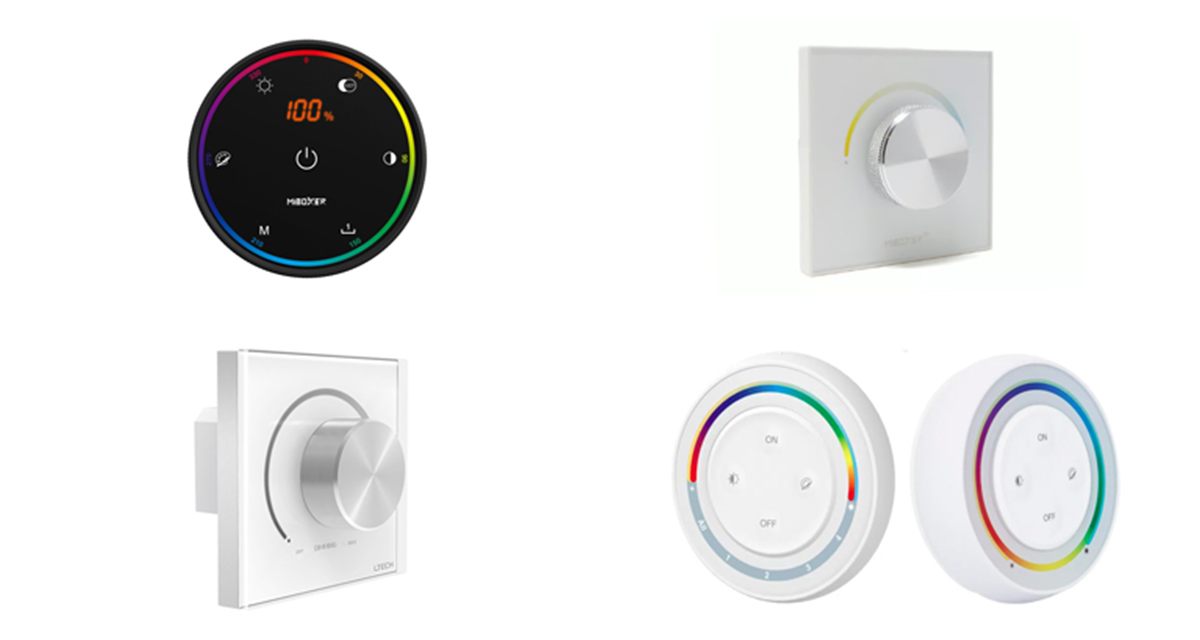
Rotary knob LED controllers: K6 knob remote, P0 CCT panel, E series wall panel and S2 puck remotes

Overview

What are rotary knob controllers?

A rotary knob controller is the simplest way to control LED lighting: turn the knob to dim, and press it to switch on and off. On CCT and colour models, a press or long press changes what the knob adjusts, so the same knob can set brightness, colour temperature or colour.

Our range has two families. Wired wall panels fit a standard wall box and send a triac, 0-10V, DALI or DMX512 signal to the LED drivers. The P0 panel goes further and dims 12–48V LED strip directly. Wireless knob and puck remotes run on batteries and send 2.4GHz RF commands to MiBoxer receivers, so they need no control wiring.

  • Turn to dim, press to switch on and off
  • Wired outputs: triac, 0-10V, DALI and DMX512
  • Wireless 2.4GHz knob and puck remotes, around 30m range
  • Single colour, CCT and RGB+CCT control
  • Wall box, surface or magnetic mounting
Rotary controllers at a glance

  • Control: Turn to dim, press to switch
  • Wired: Triac, 0-10V, DALI, DMX512
  • Wireless: RF 2.4GHz
  • Range: Around 30m
  • Light types: Dim, CCT, RGB+CCT
  • Power: Mains, DC or battery
  • Mounting: Wall box or magnetic
Request a Quote Technical Enquiry

The technology

How rotary controllers work

Inside the knob is a rotary encoder. It counts the steps as you turn, and the controller converts them into a dimming level, colour temperature or colour.

A wired panel turns that level into a control signal on its output terminals: a phase cut mains supply for triac drivers, a 0-10V voltage, or a DALI or DMX512 command to every driver on the line.

A wireless knob sends the level as a 2.4GHz message to the receivers linked to it. The receivers then dim the LED strip.

A wireless knob remote sending 2.4GHz commands to a receiver driver, and a wired rotary wall panel sending a 0-10V, DALI or DMX512 signal to a dimmable LED driver, each driving LED strip Two ways to control LED strip with a knob Wireless knob 2.4GHz RF RF receiver or receiver driver No control wiring Wired wall panel 0-10V / DALI / DMX Dimmable LED driver Fixed wall control, no batteries
Simplified illustration: a wireless knob sends RF commands to a receiver, while a wired panel sends a dimming signal to the LED driver over control cable.

Control options

Matching the controller to the driver

The controller output must match the dimming input of the LED driver or receiver.

Control methodHow it dimsWorks withOur controllers
Triac (phase cut)Cuts part of each mains cycleTriac dimmable LED driversE6-TD1
0-10VAnalogue control voltage0/1-10V dimmable driversE610-P, E610P-RF
DALIDigital commands on a 2-wire busDALI CV and CC driversE6-DA1
DMX512Digital lighting control signalDMX decoders and driversEX61
Direct CV outputPWM dims the strip directly12–48V CCT or single colour stripP0
RF 2.4GHzWireless commands to a receiverMiBoxer receivers and receiver driversK1, K6, FUT087, S1, S2

See also RF receiver driver technology for the receivers the wireless knobs control.

Our range

Rotary controllers compared

Pick wired or wireless, then the output and light type you need.

ControllerConnectionControlPower
E6-TD1Wired, triacDimmingMains
E610-PWired, 0-10VDimmingMains
E610P-RFWired 0-10V plus RFDimmingMains
E6-DA1Wired, DALIDimmingDALI bus
EX61Wired DMX512 plus RFDimmingMains
P0Wired CV output plus RFCCT or brightness12–48VDC
K1 / K6Wireless 2.4GHzCCT / RGB+CCTBattery
FUT087 / S1 / S2Wireless 2.4GHzDimming / CCT / RGB+CCT2 × AAA

Wireless models have a control distance of around 30m.

Benefits

Advantages of rotary controllers

Why a knob is still one of the best ways to control LED lighting.

Easy to use

Anyone can turn a knob. No app, no instructions and no learning curve.

Smooth, precise dimming

Fine steps from full brightness down to a low glow, with no jumps.

Any dimming system

Triac, 0-10V, DALI, DMX512 and 2.4GHz RF versions to suit the drivers.

Colour and CCT

CCT and RGB+CCT models set colour temperature and colour as well as brightness.

Wireless option

Battery knobs and pucks control receivers with no new cabling.

Fits the wall box

Wired panels replace a standard wall dimmer for a clean finish.

Selection & set-up

Choosing a rotary controller

  • Match the dimming input: triac, 0-10V, DALI, DMX512 or 2.4GHz RF, to suit the LED driver or receiver.
  • Match the light type: a dimming, CCT or RGB+CCT controller to suit the strip.
  • Check the load: stay within the panel's LED load or output current rating.
  • Wired or wireless: wired for new builds and fixed positions, wireless for retrofit and free placement.
  • Link wireless knobs: power-cycle the receiver, then press the knob's on button within a few seconds, as set out in its instructions.
  • Mind the range: around 30m in open space for wireless models; walls and metal reduce it.

Related technology and products

Complete the system with drivers, receivers and other controls:

Ask an Engineer
5
Control methods
0.1%
Min. dimming (P0)
30m
Wireless range
86mm
Wall panel size

Where rotary controllers are used

Wherever LED lighting needs simple, local control.

Residential

Kitchen, lounge and bedroom lighting with a familiar wall dimmer.

Hospitality

Restaurant and bar lighting set by staff during the day.

Offices

Meeting room dimming on DALI or 0-10V drivers.

Retail

Display and feature lighting adjusted by store staff.

Healthcare

Bedside and ward lighting with tuneable white.

Retrofit

Add a knob to existing LED strip with a wireless remote.

Explore

Explore LED control

Browse receivers, panels and remotes.

FAQ

Rotary controller questions

A rotary knob controller dims LED lighting when you turn the knob, and on some models it also changes the colour temperature or colour. Pressing the knob usually switches the lights on and off. Wired versions fit a standard wall box. Wireless versions run on batteries and send 2.4GHz RF commands to a receiver.

Choose a wired panel when you are installing new cabling or replacing a wall dimmer and want a fixed control that never needs batteries. Choose a wireless knob remote when there is no control cable to the lights, for retrofit work, or when you want to place or move the control freely.

Match the controller output to the LED driver. Use a triac panel for triac (phase cut) dimmable drivers on mains wiring, a 0-10V panel for 0/1-10V drivers, a DALI panel for DALI drivers, and a DMX512 panel for DMX decoders and drivers. A wireless knob needs a matching 2.4GHz receiver or receiver driver.

Yes. A 0-10V output can drive several 0-10V drivers up to its current rating, and a DALI or DMX512 panel controls every driver on its line. A wireless knob can be linked to many receivers, which then dim together.

Yes, on CCT and RGB+CCT models. Turning the knob adjusts brightness, and a press or long press switches it to adjust colour temperature instead. The K6 also adjusts colour, saturation and dynamic modes. The P0 can switch between CCT mode and single colour brightness mode.

Need help choosing a controller?

Our team can help you match controllers, drivers and LED strip for your project.

Talk to Our Engineers