Request a Quote

MiBoxer Remote Control Technology

How MiBoxer 2.4GHz hand-held remotes control LED strip and fittings through FUT series receivers, and how to choose the right remote.

MiBoxer 2.4GHz hand-held LED remote controls

Overview

What are MiBoxer remote controls?

MiBoxer (formerly Mi-Light) remotes are battery-powered 2.4GHz wireless controllers for LED lighting. They send commands to MiBoxer receiver drivers, which dim and colour-mix the LED strip or fittings connected to them, so lights can be switched, dimmed and colour controlled from anywhere in the room with no control wiring.

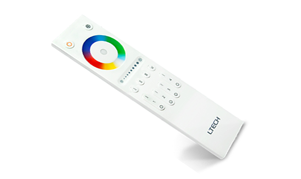
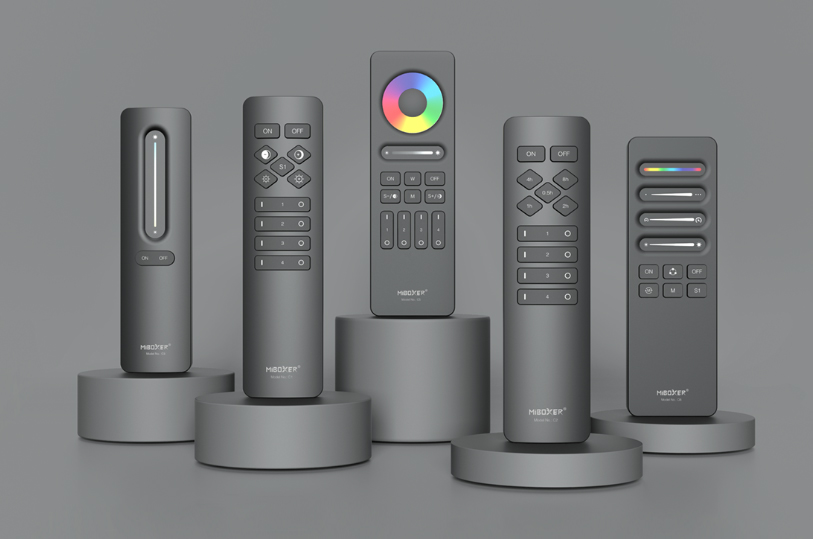
Our range covers single colour, CCT, RGB+CCT and SPI pixel control, from single zone up to 100 zones. It includes the C series, FUT088, FUT089 and FUT092 hand-held remotes, the FUT006 and FUT007 4-zone dimmers, the S series puck-style remotes, the FUT100 with an LCD display, and the C6 for SPI pixel strip.

  • 2.4GHz RF with around 30m control distance
  • Zone control from single zone up to 100 zones
  • Dimming, CCT, RGB, RGBW and RGB+CCT control
  • One remote can control many receivers in sync
  • Works with FUT receivers, WiFi controllers and touch panels
MiBoxer remotes at a glance

  • Brand: MiBoxer (Mi-Light)
  • RF: 2.4GHz
  • Range: Around 30m
  • Zones: 1, 4, 8 or 100
  • Control: Dim, CCT, RGB+CCT, SPI
  • Power: AAA batteries
  • Styles: Hand-held, puck, LCD
  • Pairs with: FUT series receivers
Request a Quote Technical Enquiry

The technology

How MiBoxer remotes work

Each remote has its own ID. When you press a button, it sends a short 2.4GHz message with its ID, the zone and the command. A receiver only responds to remotes and zones it has been linked to.

Each zone button controls the receivers linked to it, so one remote can set different areas to different levels and colours, or switch them all together.

Receivers relay the signal to other receivers within 30m, which extends the range and keeps dynamic effects in sync across several controllers.

A 4-zone MiBoxer remote controlling one receiver in zone 1 and two synchronised receivers in zone 2, each driving LED strip One remote, separate zones, synchronised receivers Zone 1 Zone 2 Zone 3 Zone 4 4-zone remote 2.4GHz FUT receiver Zone 1: kitchen Warm white, 100% FUT receiver Zone 2: lounge FUT receiver Zone 2: lounge Relay / sync RGB colour, both in step
Simplified illustration: each zone button controls the receivers linked to it, and receivers in the same zone relay the signal and stay in sync.

Control options

Matching the remote to the lights

Choose the remote type to match the LED strip and the receiver you are using.

Light typeRemote controlsReceiver channelsOur remotes
Single colourOn/off and brightness1FUT006, FUT-087
Tuneable white (CCT)Brightness and colour temperature2FUT007, C1, C3, S1, S1+
RGB, RGBW, RGB+CCTColour wheel, white, brightness and dynamic modes3 to 5C5, C8, FUT088, FUT089, FUT092, FUT100, S2
SPI pixel stripColour order, pixel count, effects and speedSPI dataC6 with SPIR3 controller

See also RF receiver driver technology for the receivers these remotes control.

Our range

MiBoxer remotes compared

Pick the number of zones you need, then the style you prefer.

RemoteZonesControlStyle
C1 / C34 / 1Brightness and CTHand-held
C5 / C84 / 8RGB+CCTHand-held
FUT0881Dimming, CT, RGB, RGB+CTHand-held
FUT0898Dimming, CT, RGB, RGB+CTHand-held
FUT0924Dimming, CT, RGB, RGB+CTHand-held
FUT006 / FUT0074Single colour / CCTCompact dimmer
FUT-087 / S1 / S1+ / S21 to 4Brightness, CT, RGB+CCTPuck, 2 × AAA
FUT100100Dimming, CT, RGBW+CTHand-held with LCD
C6—SPI pixel colour and effectsHand-held, 2 × AAA

All remotes use 2.4GHz RF with a control distance of around 30m.

Benefits

Advantages of MiBoxer remotes

Why a MiBoxer remote is a simple way to control LED lighting.

No control wiring

Control lights from anywhere in the room, with no cables between the remote and the receivers.

Zone control

Control areas separately or together, from single zone up to 100 zones.

Full colour control

Dimming, tuneable white, RGB and RGB+CCT, with built-in dynamic modes.

Sync and relay

Receivers pass on the signal, extending range and keeping effects in step.

One system

The same remotes work with MiBoxer receivers, WiFi controllers and touch panels.

LCD option

The FUT100 shows the zone, brightness and battery level on its display.

Selection & set-up

Choosing and setting up a MiBoxer remote

  • Match the light type: a dimming, CCT or RGB+CCT remote to suit the strip and receiver.
  • Count the zones: one zone per area you want to control separately.
  • Link each receiver: power-cycle the receiver, then press the zone's on button three times within a few seconds.
  • Group receivers: link several receivers to the same zone to control them together.
  • Mind the range: around 30m in open space; walls and metal enclosures reduce it.
  • Unlink if needed: power-cycle the receiver and press the zone's on button five times.

Related technology and products

Complete the system with receivers, panels and controllers:

Ask an Engineer
2.4GHz
RF band
30m
Control distance
100
Zones (FUT100)
0
Control cables

Where MiBoxer remotes are used

Wherever LED lighting needs simple, wireless local control.

Residential

Kitchen, lounge, bedroom and garden lighting from the sofa.

Hospitality

Bar and restaurant mood lighting set by staff.

Retail

Display and window lighting in zones.

Events

Colour lighting on stands and stages, set up in minutes.

Signage

Colour and brightness control of illuminated signs.

Retrofit

Add remote control to LED strip without new cabling.

Explore

Explore wireless LED control

Browse receivers, panels and other remotes.

FAQ

MiBoxer remote questions

MiBoxer (Mi-Light) 2.4GHz remotes work with MiBoxer FUT series receiver drivers, LS2 and CL series receivers, compatible WiFi controllers such as the WL5, and MiBoxer touch panels. They use MiBoxer's own 2.4GHz protocol, so they will not control other brands of RF receiver.

Switch the receiver's power off and on again, then within a few seconds press the on button of the zone you want, usually three times. The lights blink to confirm the link. To unlink, repeat the power cycle and press the zone on button five times. The exact steps are in each receiver's instructions.

A zone is a group of receivers that the remote controls together. A 4-zone remote can switch, dim and set the colour of four areas separately, or all at once. MiBoxer remotes range from single zone up to 100 zones on the FUT100, which has an LCD display to show the selected zone.

MiBoxer remotes have a control distance of around 30 metres. Receivers also pass the signal on to other receivers within 30 metres, which extends the effective range and keeps dynamic effects in sync across several controllers.

Match the remote to the type of light and the number of zones: a dimming remote for single colour strip, a CCT remote for tuneable white, or an RGB+CCT remote for colour strip, which can also control dimming and CCT receivers. Then pick a style, such as the hand-held C or FUT series or the puck-style S series.

Need help choosing a remote?

Our team can help you match remotes, receivers and LED strip for your project.

Talk to Our Engineers