Request a Quote

E Series RF Touch Panel Technology

How LTECH E series wall touch panels control LED lighting by direct output, DMX512 or 0-10V, with 2.4GHz RF for remotes and receivers.

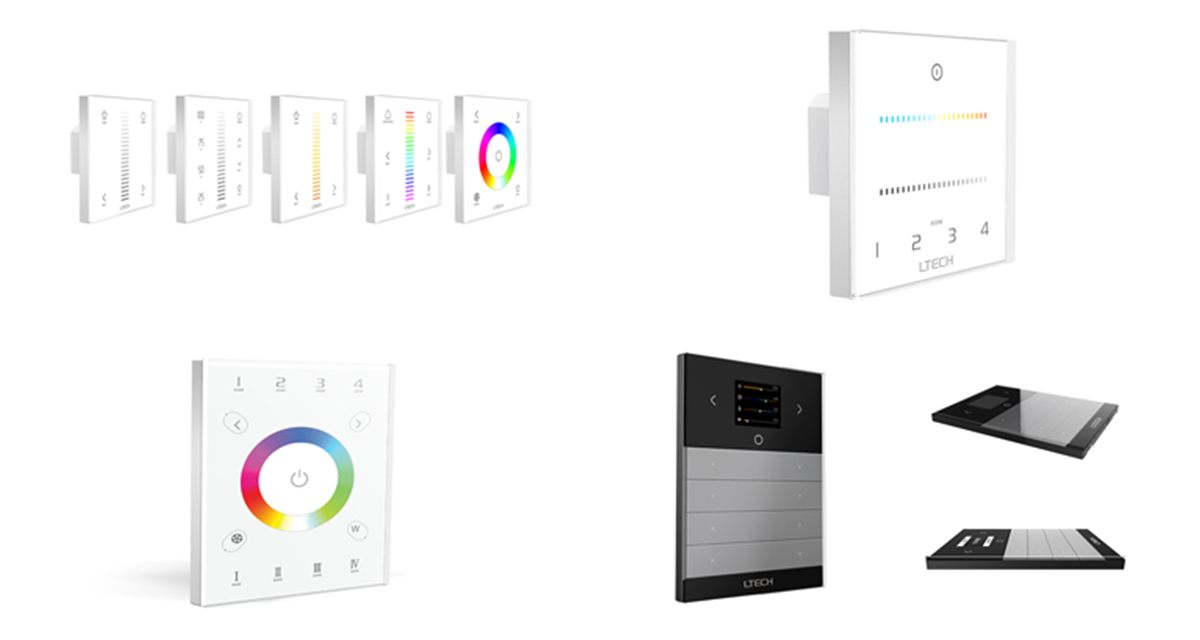
LTECH E series, ECT2, UX8 and MS-WF-512 touch panels

Overview

What are E series RF touch panels?

E series panels are LTECH glass touch panels that fit a standard 86mm wall box. Unlike battery panels, they are wired to power and give a fixed wall control with touch sliders, colour wheels, zone keys and scene keys.

The range offers three ways to reach the lights. The E1 to E4S panels drive 12–24V LED strip directly from their terminals. The EX panels send a DMX512 signal to DMX decoders and drivers. The E1S-AD and ECT2 send 0-10V to dimmable drivers. Every panel also has a 2.4GHz RF radio, so it works with LTECH hand-held remotes, RF receivers and the L-BUS app through a WiFi gateway.

  • Glass touch panel for a standard 86mm wall box
  • Direct CV output, DMX512 or 0-10V
  • 2.4GHz RF to remotes, receivers and gateways
  • Dimming, CCT, RGB and RGBW control
  • Scene keys that save and recall lighting states
E series panels at a glance

  • Brand: LTECH
  • Outputs: Direct CV, DMX512, 0-10V
  • RF: 2.4GHz
  • Control: Dim, CT, RGB, RGBW
  • Power: 12–24VDC or 100–240VAC
  • Size: 86 × 86 × 36mm
  • Remotes: F and Q series
  • Working temp.: -20 to 55°C
Request a Quote Technical Enquiry

The technology

How E series panels work

A capacitive touch surface reads the keys and sliders. The panel then sends the result to the lights in up to three ways at once.

Wired output: direct PWM to the LED strip on the E1 to E4S, a DMX512 signal on the EX panels, or a 0-10V signal on the E1S-AD and ECT2.

2.4GHz RF: the same commands go wirelessly to matched LTECH receiver drivers, with sync so dynamic modes stay in step. Remotes and a WiFi gateway can control the panel in the same way.

An E series wall touch panel with a wired output to LED drivers or strip, and 2.4GHz RF links to an RF receiver driver, a hand-held remote and a WiFi gateway One wall panel, wired and wireless control Remote WiFi Gateway 1 2 3 4 E series panel 86mm wall box Wired output Strip, DMX or 0-10V driver 2.4GHz RF, in sync RF receiver driver
Simplified illustration: the panel controls lights over its wired output and over 2.4GHz RF at the same time, and can itself be controlled by remotes and a WiFi gateway.

Control options

Matching the panel to the system

Choose the panel by how it connects to the lights.

Wired outputPanel powerConnects toOur panels
Direct CV (PWM)12–24VDC12V or 24V LED strip, up to 288WE1, E1S, E2, E3, E3S, E4, E4S
DMX512100–240VACDMX decoders and DMX driversEX1S, EX2, EX4S
0-10V100–240VAC0-10V dimmable and tuneable white driversE1S-AD, ECT2
DMX512 (RJ45)5VDC adapterDMX devices, plus R4 RF receiversUX8
DMX512 / RDM5–24VDCLTECH DMX/RDM decoders, plus WiFi appMS-WF-512

See also DMX CV LED driver technology for the drivers the DMX panels control.

Our range

E series panels compared

Pick the wired output, then the light type.

PanelControlOutputMatching remotes
E1 / E1SDimmingDirect CVF1 / F5
E2CTDirect CV, 4A × 2CHF2 / F6
E3 / E3SRGBDirect CV, 4A × 3CHF3 / F7
E4 / E4SRGBWDirect CV, 3A × 4CHF4 / F8
EX1S / EX2 / EX4SDim / CT / RGBWDMX512F1 / F2 / F4, Q series
E1S-ADDimming0-10V, 15mAF1 / F5, Q series
ECT2Dim / CT2 × 0-10V, 15mAF2 / F6, Q2
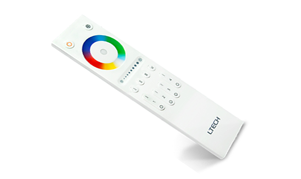
UX8RGBW, 4 zonesDMX512 (RJ45) and RFV8
MS-WF-512Dim to RGBWYDMX512 / RDM, WiFiScene remote included

All panels use 2.4GHz RF. The E, EX, E1S-AD and ECT2 panels measure 86 × 86 × 36mm.

Benefits

Advantages of E series panels

Why a wired touch panel with RF is a flexible wall control.

Fits the wall box

A glass touch panel that replaces a standard 86mm wall control.

No batteries

Powered from the mains or the LED supply, so it is always ready.

Wired and wireless

Control lights over the wired output and 2.4GHz RF at the same time.

Fits any system

Direct drive for small runs, DMX512 or 0-10V for larger projects.

Scenes

Long press a scene key to save the current lighting, and short press to recall it.

App control

Add an LTECH WiFi gateway to control the panel's lights from a phone.

Selection & set-up

Choosing and setting up an E series panel

  • Choose the output: direct CV for small runs, DMX512 or 0-10V to match larger drivers.
  • Match the light type: dimming, CT, RGB or RGBW to suit the strip.
  • Check the load: the direct-drive panels give up to 4A per channel (3A on RGBW), 288W maximum.
  • Fit the panel: wire the power and output, then fit it to a standard 86mm wall box.
  • Match a remote: long press the panel's on/off key until its indicator flickers, then long press on/off on the remote.
  • Add the app: match the panel to an LTECH WiFi gateway in the L-BUS app's Zone Set screen.

Related technology and products

Complete the system with drivers, receivers and remotes:

Ask an Engineer
3
Wired output types
288W
Max. direct load
2.4GHz
RF band
86mm
Wall box size

Where E series panels are used

Wherever LED lighting needs a fixed, stylish wall control.

Residential

Kitchen, lounge and bedroom strip lighting from the wall.

Hospitality

Restaurant and bar scenes recalled at the touch of a key.

Offices

Meeting room dimming and tuneable white on 0-10V drivers.

Retail

Colour and feature lighting on DMX512 systems.

Showrooms

RGBW display lighting with synchronised dynamic modes.

Architectural

Cove and facade lighting with wall, remote and app control.

Explore

Explore LED control

Browse drivers, panels and remotes.

FAQ

E series panel questions

An E series panel is an LTECH glass touch panel that fits a standard 86mm wall box. It is wired to power and controls LED lighting from the wall, and it also has a 2.4GHz RF radio, so it can be used alongside LTECH hand-held remotes, RF receiver drivers and the L-BUS app through a WiFi gateway.

The E1 to E4S panels run from 12-24VDC and drive constant voltage LED strip directly from their output terminals. The EX panels run from mains and send a DMX512 signal to DMX decoders and drivers. The E1S-AD and ECT2 run from mains and send a 0-10V signal to 0-10V drivers. All of them also send 2.4GHz RF to compatible receivers.

The directly wired E1 to E4S panels deliver up to 4A per channel, or 3A per channel on the 4-channel RGBW models, with a maximum of 288W at 24V. For larger loads, use an EX panel with DMX decoders, a 0-10V panel with 0-10V drivers, or add RF receiver drivers.

Yes. Each panel can be matched with an LTECH F series or Q series remote of the same type, for example an F1 or F5 for the E1 dimming panel or an F2 or F6 for the E2 CCT panel. The remote then controls the same lights as the panel, and several remotes can control one panel.

Yes, through an LTECH WiFi gateway such as the WiFi-108 and the L-BUS app. The panel's scene keys match the scenes in the app, so a scene can be changed from either the panel or the phone. The UX8 works with the WiFi-104, and the MS-WF-512 has WiFi built in.

Need help choosing a panel?

Our team can help you match panels, drivers and LED strip for your project.

Talk to Our Engineers