E-Paper Display Technology
E-paper display modules from 1.54" to 4.2", in black and white or four colours, with front light and touch options. Find out how e-paper holds an image with no power, and how to choose and connect a module.
E-paper display modules from 1.54" to 4.2", in black and white or four colours, with front light and touch options. Find out how e-paper holds an image with no power, and how to choose and connect a module.
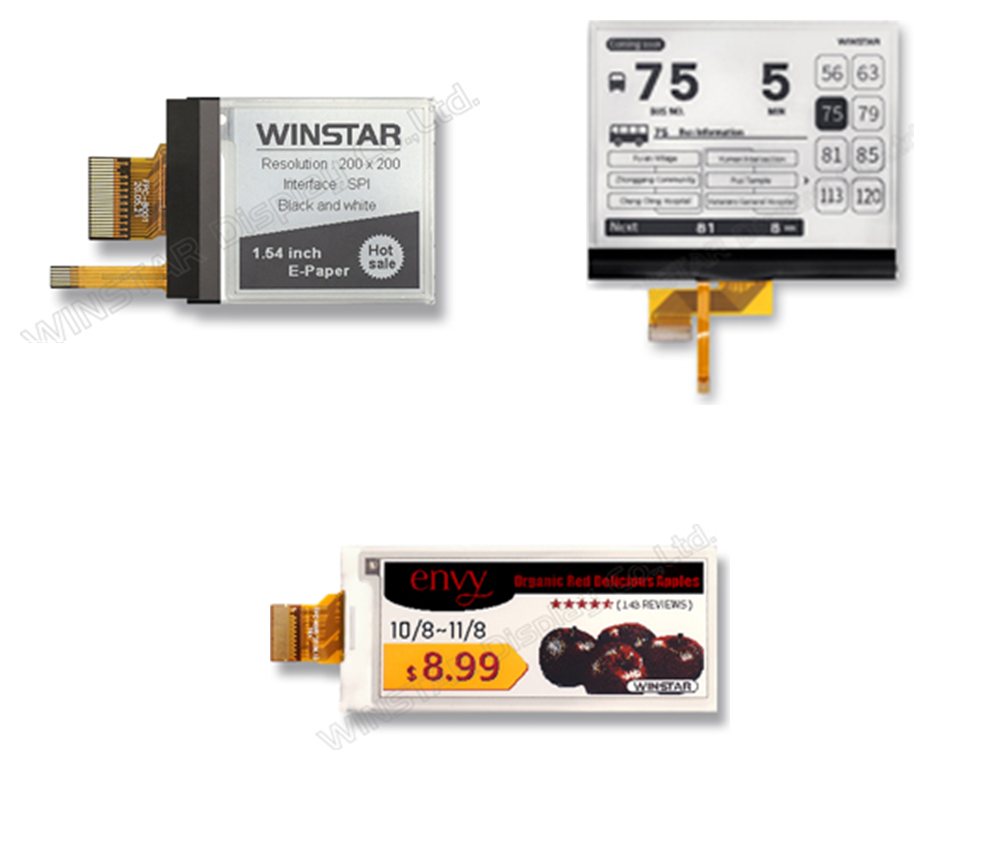
An e-paper display, or EPD (Electronic Paper Display), makes its image from tiny charged pigment particles rather than light. It looks like printed ink on paper, reads clearly in bright sunlight and from almost any angle, and holds its image with the power switched off.
Because the display only uses power while the picture changes, e-paper suits battery-powered products that update now and then, such as electronic shelf labels, smart tags and IoT devices. As the authorised distributor for Winstar Display Corporation we offer e-paper modules from the 1.54" 200x200 up to the 4.2" 400x300, in black and white or four colours, with front light and capacitive touch options.
Image stays with no power
Sizes from 1.54" to 4.2"
Black and white or four-colour
SPI interface
Front light and touch options
Modules from 1.0mm thick
E-paper is an electrophoretic display. A thin film holds millions of tiny cells filled with clear fluid and charged pigment particles: white particles with one charge and black with the other. Four-colour panels add red and yellow pigments.
A TFT backplane puts a voltage on each pixel electrode, which pulls one colour of particle to the front, where you see it, and pushes the others to the back. When the voltage is removed the particles stay where they are, so the image holds with no power. The display reflects room light like paper, rather than giving out its own.
Simplified illustration, not to scale: particles and cells are enlarged for clarity
Why designers choose e-paper for low-power, always-on displays
Power is drawn only during an update, so batteries can last a very long time in devices that change content now and then.
Bistable pixels keep the last image with the power off, so a label or sign stays readable even if the battery runs out.
A reflective display gets clearer in bright light, with high contrast like ink on paper.
The image reads clearly from almost any angle, with no backlight glare.
Modules from 1.0mm thick and a few grams in weight, suiting slim labels and wearables.
Front-lit models read in low light, and the 4.2" is available with a capacitive touch panel.
Black and white e-paper shows 1-bit images and is the choice for text, symbols and barcodes. These models also offer a front light for reading in low light.
Four-colour panels add red and yellow pigments, so prices, warnings and logos can stand out. They have more particles to move, so an update takes longer than on a black and white panel.
| Type | Models | Notes |
|---|---|---|
| Black and white | 1.54", 2.7", 2.9" 296x128, 4.2" | Front light on all; touch option on 4.2"; 0℃ to +50℃ |
| Four-colour | 2.13" 122x250, 2.9" 128x296 | Black, white, red and yellow; no front light; 0℃ to +40℃ |
Each module has an SPI interface on a flexible cable. Your microcontroller writes the image into the driver's memory, starts an update, then waits for the BUSY line to clear. The update waveform depends on temperature, so the driver can read an external I2C temperature sensor.
Winstar provides a datasheet and demo code for each module, and our engineers can help with samples and integration.
| Signal | Pins | Purpose |
|---|---|---|
| SPI | CS#, SCL, SDA | Chip select, serial clock and data |
| Data/command | D/C# | Marks each byte as data or a command |
| Control | RES#, BUSY | Reset input; busy output during an update |
| Bus select | BS1 | Selects the interface mode |
| Temperature | TSCL, TSDA | I2C to an external temperature sensor |
Compare our e-paper modules by size, resolution, colours, options and outline
| Model | Size | Resolution | Colours | Options | Outline (mm) |
|---|---|---|---|---|---|
| WAA0154A2AAA4NXXX000 | 1.54" | 200x200 | Black, white | Front light | 31.80 x 37.32 x 1.85 |
| WAA0213A2CNA6NXXX000 | 2.13" | 122x250 | Black, white, red, yellow | None | 29.2 x 59.2 x 1.0 |
| WAA0270A2AAA7NXXX000 | 2.7" | 264x176 | Black, white | Front light | 45.8 x 70.42 x 1.58 |
| WAA0290A2CNA8NXXX000 | 2.9" | 128x296 | Black, white, red, yellow | None | 36.7 x 79.0 x 1.2 |
| WAA0290A2AAA8NXXX000 | 2.9" | 296x128 | Black, white | Front light | 36.7 x 79.0 x 1.2 |
| WAA0420A2AAB5NXXX000 | 4.2" | 400x300 | Black, white | Front light | 91 x 77 x 2.02 |
| WAA0420A2ADB5NXXX000 | 4.2" | 400x300 | Black, white | Front light, capacitive touch | 91 x 77 x 2.02 |
All modules use an SPI interface. Outline figures from Winstar's product pages; see the datasheet or contact us for details. View E-Paper Display Modules →
E-paper suits battery-powered products whose content changes now and then
Prices and promotions updated wirelessly across a store.
Reusable labels for warehouses, containers and equipment.
Sensors and meters that show readings for years on one battery.
Badges, watches and portable devices that need a thin, light display.
Meeting room, door and transport timetable signs.
Thermostats, controls and status panels that stay readable.
Our engineering team can help specify or develop a custom solution for your exact requirements.
Talk to Our Engineers